From Scans to Published Ebook: Building a Digital Publication Pipeline
How I built a composable pipeline to take physical book scans through OCR, automated cleaning, AI copy-editing, and Vellum layout — and packaged it as a reusable toolchain with a step-by-step tutorial.
The Armenian Institute holds a collection of out-of-print books that deserve a second life. The texts exist as physical copies and sometimes as flat scans — but not in any form that can be copy-edited, laid out for modern ebook formats, or distributed digitally. Getting from a shelf of scanned pages to a published epub involves a chain of steps, each of which introduces a different kind of problem. I built a pipeline to automate as much of that chain as possible, and packaged it as a reusable toolchain that anyone can adopt for their own digitisation project.
The result is scatterpub-toolchain, an open-source set of Python scripts and Claude Code skills for taking physical book scans to a finished ebook. There is also a companion example project with real sample scans and a step-by-step tutorial that gets you from zero to a Word document ready for Vellum import in around thirty minutes.
The Problem With Digitising Literary Texts
Digitising a technical document is relatively forgiving. A few garbled words in a user manual are easy to spot because the text is structured and factual. Literary prose is harder. A missed letter can produce a word that looks plausible in isolation but is wrong in context: bom for born, Westem for Western. A fused word — ofMezre, onthe — reads as noise in a technical document but might almost pass in a novel.
The pipeline has to handle three distinct categories of error:
- Mechanical OCR artefacts — running headers, invisible characters, hyphenated line-breaks — that are structural and regular enough for a script to catch.
- Contextual OCR errors — dropped characters, character substitutions, fused words — that require reading in context.
- Style and editorial issues — punctuation inconsistencies, British versus American spelling, capitalisation — that require applying a specific style guide.
Each category needs a different tool.
The Pipeline
Scanned page PDFs
      ↓  ocr-to-markdown.py
Raw Markdown        ← running headers, invisible chars, line-break hyphens
      ↓  clean-ocr.py --join-hyphens --reflow
Clean Markdown      ← mechanically corrected, reflowed paragraphs
      ↓  Claude Code: /copyeditor (OCR artefact pass)
AI-corrected MD     ← fused words, dropped chars, proper noun fixes
      ↓  copy into draft/, manual review
Draft Markdown      ← human-edited, then imported into Vellum
      ↓  Vellum (layout and design)
      ↓  Claude Code: /copyeditor (style review)
Final Vellum file   ← copy-edited against Hart's Rules or CMOS
      ↓  md-to-docx.py (or Vellum direct export)
Published ebook / Word document
Step 1: OCR with marker-pdf
scripts/ocr-to-markdown.py takes a folder of per-page PDFs and produces a single Markdown file. The default OCR engine is marker-pdf, a machine-learning model that significantly outperforms traditional OCR engines on book typography.
python3 toolchain/scripts/ocr-to-markdown.py \
  "publishing/tell-me-bella/ocr/scans/clean"
# → publishing/tell-me-bella/ocr/tell-me-bella-raw.md
The raw output has several predictable problems. Running headers — the page number and book title repeated at the top of every page — appear as stray paragraphs. Invisible Unicode characters creep in (soft hyphens, non-breaking spaces, zero-width joiners). Words split across lines by the typesetter become news-\npaper in the OCR output.
Getting clean scans
The quality of the raw OCR output depends almost entirely on the quality of the input scans. Professional book scanning equipment presses a sheet of glass against the page to flatten it; a hand-held camera over a slightly warped page produces curved baselines that confuse any OCR engine. Practical tips that made a significant difference:
- Align pages in Acrobat before OCR. I crop each scan to a clean rectangular block of text with no opposite-page bleed visible.
- Put black paper behind the page. Text on the verso side bleeds through the page under bright scanning light. Black paper behind the page eliminates this entirely.
- Scan each page individually. A spread scan with the gutter in frame gives the OCR engine two columns of text and a curved spine to deal with.
Step 2: Mechanical Cleaning with clean-ocr.py
The cleaning script addresses artefacts that have a regular enough structure to catch programmatically.
python3 toolchain/scripts/clean-ocr.py \
  "publishing/tell-me-bella/ocr/tell-me-bella-raw.md" \
  --join-hyphens --reflow
# → publishing/tell-me-bella/ocr/tell-me-bella-clean.md
--join-hyphens
A word split across a line break by the typesetter becomes two fragments joined by a hyphen: news-\npaper. The script detects this pattern and joins them: news-paper. The hyphen is kept so a human can review whether to remove it (newspaper) or retain it (news-paper).
--reflow
OCR preserves the typeset line-breaks from the printed page. A paragraph in the original book might span seven lines of text; the raw output has seven separate lines. --reflow joins consecutive non-blank lines into a single long line, so each paragraph becomes one continuous string — standard Markdown prose style and much easier to read and search.
def reflow_paragraphs(text):
    lines = text.split('\n')
    result, buffer = [], []
    for line in lines:
        stripped = line.rstrip()
        if stripped == '':
            if buffer:
                result.append(' '.join(buffer))
                buffer = []
            result.append('')
        else:
            buffer.append(stripped)
    if buffer:
        result.append(' '.join(buffer))
    return '\n'.join(result)
Typography normalisation
The script also runs three typography passes that are always on:
- Smart quotes — straight
'and"converted to curly equivalents. The algorithm uses the preceding character to determine direction: a quote preceded by a space, newline, or opening bracket opens; otherwise it closes. YAML front matter is excluded. - En-dash normalisation —
-(space-hyphen-space) converted to–(spaced en dash), the Hart’s Rules style for parenthetical asides. - Ellipsis normalisation —
...converted to…(the Unicode ellipsis character).
Step 3: AI OCR Correction with Claude Code
The cleaning script catches structural artefacts, but some errors require reading in context. The copyeditor skill has a dedicated OCR artefact pass for this:
/copyeditor

Please apply an OCR artefact correction pass to
publishing/tell-me-bella/ocr/tell-me-bella-clean.md
and write the corrected version to
publishing/tell-me-bella/ocr/tell-me-bella-ai-clean.md
The skill knows what to look for:
| Error type | Example | Cause |
|---|---|---|
| Fused words | ofMezre, OldRomanRoad | Word boundary lost by OCR |
| Dropped characters | bom for born, Westem for Western | r, n, rn cluster missed |
d as cl | Sadcller for Saddler | Typeface ambiguity |
| Spurious characters in names | Tow:vanda, Ktikor | OCR inserting noise into proper nouns |
| Digit spacing | 189 3 for 1893 | OCR splitting a number |
The AI pass is positioned after the script-clean step so Claude sees reflowed, artefact-free text — it only has to think about contextual errors, not mechanical ones.
Step 4: Vellum for Layout
After manual review and editing, the draft Markdown is imported into Vellum for layout. Vellum handles the visual design, chapter structure, and multi-format export (epub for all the major retailers, PDF for print).
The .vellum file format is an NSKeyedArchiver binary property list. Newer versions of Vellum save as a ZIP archive containing content.vellumcontent; older versions save as a macOS package directory with the same file at its root. The extract-vellum.py script handles both:
def _load_plist(vellum_path: Path) -> dict:
    if vellum_path.is_dir():
        content_path = vellum_path / 'content.vellumcontent'
        with open(content_path, 'rb') as f:
            return plistlib.load(f)
    else:
        with zipfile.ZipFile(vellum_path) as z:
            with z.open('content.vellumcontent') as f:
                return plistlib.load(io.BytesIO(f.read()))
io.BytesIO wraps the ZIP member bytes so plistlib.load() gets a seekable binary file object — the ZipExtFile returned by z.open() is binary but not seekable, and plistlib needs to seek.
Inside the plist, the object graph is an NSKeyedArchiver archive. Python’s standard library plistlib handles binary plists natively. The traversal pattern is:
objects = plist['$objects']   # flat array of all objects

def deref(objects, ref):
    if isinstance(ref, plistlib.UID):
        return objects[ref.data]   # .data, not .integer — attribute changed between Python versions
    return ref
Each chapter node has a typeName ('foreword', 'chapter', 'epilogue', etc.), a title, and a text field containing an NSAttributedString whose plain text lives under its NSString key.
Step 5: AI Copy-Edit Review
Once the book is in Vellum and close to final, the copyeditor skill produces an HTML annotation report. The .vellum file is the source of truth at this stage — it is extracted to Markdown, reviewed, and any agreed changes go back into Vellum:
python3 toolchain/scripts/extract-vellum.py \
  "publishing/tell-me-bella/Tell me, Bella.vellum" \
"publishing/tell-me-bella/draft/tell-me-bella.md"/copyeditor
Please produce a full copy-edit review of
publishing/tell-me-bella/draft/tell-me-bella.mdThe review is written to a self-contained HTML file with embedded CSS that opens in any browser without a build step.
The style guide system
The skill selects its style guide from the language field in book.md:
---
title: "Tell me, Bella"
author: Vahan Totovents
language: en-GB
---
language | Style guide |
|---|---|
en-GB | Hart’s Rules (British English) |
en-US | Chicago Manual of Style, 18th edition |
The two guides differ on several points that matter in literary texts:
| Rule | Hart’s (en-GB) | CMOS (en-US) |
|---|---|---|
| Primary quotes | Single: 'like this' | Double: "like this" |
| Parenthetical dashes | Spaced en dash – | Unspaced em dash — |
| -ize spellings | Oxford -ize: realize, organize | CMOS -ize (same) |
The issue taxonomy
Every flagged issue is categorised and colour-coded in the HTML report:
| Label | Colour | Use for |
|---|---|---|
| TYPO | Red | Spelling errors, wrong or missing words |
| PUNCT | Orange | Quotation marks, dashes, ellipsis |
| STYLE | Yellow | Spelling variants, capitalisation, numbers |
| CONSISTENCY | Blue | Same word or name formatted differently across the book |
| QUERY | Purple | Ambiguous phrasing — flagged for a human to decide |
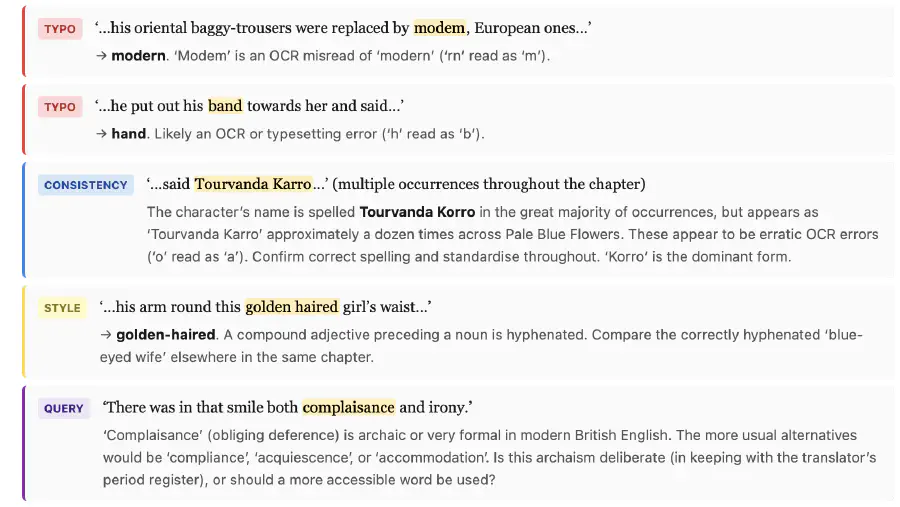
The QUERY category is particularly important for translated texts. Some unusual phrasings may be deliberate choices of the translator rather than errors. Flagging them as QUERY rather than correcting them keeps the editorial decision with the human.
Iterating to clean
Each round of review produces fewer issues as the human works through them in Vellum. Over three passes on Tell me, Bella, the count went from 41 issues to 18 to 29 (the third pass catching subtler things the first two missed). The workflow is:
- Extract fresh Markdown from Vellum
- Run the copy-edit review
- Work through the HTML report and make agreed changes in Vellum
- Repeat
The Toolchain as a Submodule
The scripts and skills are packaged as scatterpub-toolchain, designed to be embedded in a book project repository as a git submodule. This keeps the toolchain versioned separately from the book content, and lets multiple book projects share the same toolchain while pinning independently to a known-good commit.
git submodule add https://github.com/scattercode/scatterpub-toolchain.git toolchain
git submodule update --init
Claude Code skills are discovered by the IDE from .claude/skills/. Symlinking the skills from the submodule wires them up automatically for every contributor without any post-clone setup:
mkdir -p .claude/skills
ln -s ../../toolchain/.claude/skills/copyeditor .claude/skills/copyeditor
Symlinks are tracked by git, so a fresh git clone --recurse-submodules of a book project gets everything in place.
The Example Project
scatterpub-toolchain-example is a fork-ready project with real sample scans and a TUTORIAL.md covering all six parts of the pipeline:
| Part | What it covers |
|---|---|
| 1 | Set up: clone, submodule init, Homebrew tools, Poetry, virtual environment |
| 2 | OCR the scans |
| 3 | Clean the raw output |
| 4 | AI OCR correction pass |
| 5 | AI copy-edit review |
| 6 | Generate a Word document |
The tutorial takes around thirty minutes end to end. The sample scans are real pages from a public-domain text, so the OCR output is genuinely imperfect and the cleaning and correction steps produce visible, meaningful changes.
The example project deliberately contains no Armenian Institute book data. This separation means the tutorial is self-contained and forkable — anyone can follow it without access to the original book files.
What the Pipeline Doesn’t Do
Page numbering. OCR text has no reliable page-number information. Running headers are stripped by the clean script, but the text is treated as a continuous stream. For footnotes that reference page numbers in the original, these need manual attention.
Illustrations. The pipeline processes text only. Images in the original scan are ignored by the OCR engine. If a book contains plates or illustrations that need to appear in the digital edition, these must be handled separately.
Right-to-left text. The pipeline was built for left-to-right English and Armenian Latin-transliterated text. RTL scripts (Armenian in the original script, Arabic, Hebrew) would need a different OCR configuration and different clean-up heuristics.
Lessons
The clean step and the AI step do different things — keep them separate
It is tempting to ask the AI to do everything: fix the mechanical artefacts and the contextual errors in one pass. In practice it is better to do the mechanical cleaning first. The script is faster and cheaper for what it can do, and it gives the AI a cleaner signal — Claude does not have to distinguish between a running header and a genuine title, or between an invisible character and a meaningful dash.
The .vellum file is the source of truth once layout begins
All editorial changes after the Vellum import go back into Vellum, not into any intermediate Markdown file. The Markdown extract is a disposable snapshot for review purposes — it is generated fresh at the start of each review cycle. Treating the extract as editable breaks this constraint and introduces drift between the Markdown and the Vellum file.
A style guide in code is a forcing function for consistency
The copy-editor skill applies the same rules to every chapter, every session, regardless of how many times the book has been reviewed. A human editor working alone will be more rigorous on chapter one than chapter seven. The AI pass catches the same class of issues throughout — it does not get tired or start skipping edge cases near the end of a long document.